What is an AI model, and why are there so many now?
An AI model is software trained on massive amounts of information, text, images, or code, to recognize patterns and generate useful output. Different models are trained on different data for different purposes, which is why some excel at writing, others at analyzing images, and others at research with citations.
The technology behind most text-based assistants is called a large language model, or LLM, which is trained on huge volumes of text to understand and generate human language. Think of it as the underlying engine that gives tools like ChatGPT, Claude, and Gemini their ability to hold a conversation.
How do ChatGPT, Claude, and Gemini actually compare?
ChatGPT, Claude, and Gemini are all capable general-purpose assistants with genuine strengths in different areas. ChatGPT is a strong all-around writing and brainstorming partner, Claude tends to handle long documents and careful reasoning well, and Gemini integrates deeply with Google's ecosystem.
| Assistant | Best known for | Good fit for | Worth knowing |
|---|---|---|---|
| ChatGPT (OpenAI) | Versatile, conversational writing and brainstorming | Drafting, learning through conversation, general everyday use | Broad plugin and integration ecosystem |
| Claude (Anthropic) | Careful reasoning and long-document handling | Summarizing reports, contracts, and lengthy research | Large context window for processing long text at once |
| Gemini (Google) | Google Search and Workspace integration | Google-centric workflows, up-to-date web-connected answers | Multimodal, handling text, images, and more together |
| Perplexity | Sourced, citation-backed answers | Research and fact-checking where sources matter | Functions more like a conversational search engine |
What happens when you give all three the exact same prompt?
Comparison tables only tell you so much, so I ran a live test. I gave ChatGPT, Claude, and Gemini the identical prompt: "Explain what a neural network is in under 100 words, using a cooking analogy. Keep it beginner-friendly." Here is what each one actually returned, captured on July 15, 2026.
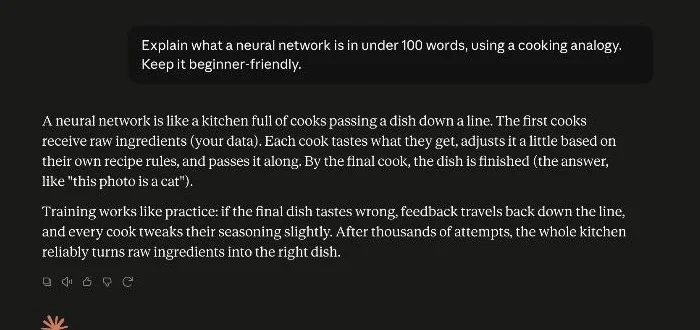
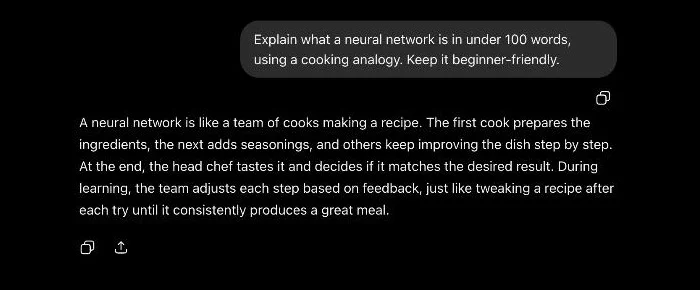
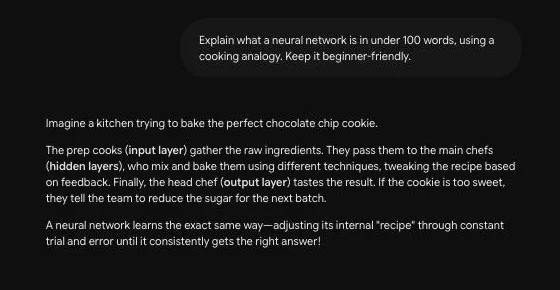
The takeaway from this small test matches my longer experience: all three are competent at plain-language explanation, and the differences are about style rather than correctness. Gemini taught the vocabulary, Claude explained the learning process most intuitively, and ChatGPT optimized for brevity. If you are choosing your first assistant, this is why I suggest picking based on what you already use daily rather than on benchmark charts.
What about tools beyond the big three chat assistants?
Beyond general-purpose chat assistants, specialized AI tools exist for research, image generation, video generation, and coding, each trained and tuned for its narrower job. Knowing when to reach for a specialist tool instead of a general assistant can save time.
- Perplexity: positions itself as an answer engine, providing direct answers with cited sources, which makes it well suited to research and fact-checking.
- Image and video generation tools: dedicated generative tools tend to outperform the image or video features bolted onto general chat assistants, so if visual output is your main goal, it is worth trying a dedicated tool.
- Coding-focused assistants: some tools and models are tuned specifically for programming help, which can be worth exploring if you code regularly, though general assistants like ChatGPT and Claude also handle coding tasks reasonably well.
- Open-weight models: options like Llama and Mistral can be run by developers on their own infrastructure or through third-party apps, which matters more for builders than everyday users who just want a ready-made chat interface.
For most beginners, a general-purpose assistant like ChatGPT, Claude, or Gemini covers the vast majority of everyday needs, and reaching for a specialized tool only becomes worthwhile once you have a specific, recurring task that a general assistant handles noticeably worse, such as research that demands cited sources or image generation that needs to look polished rather than merely usable.
What mistakes do beginners commonly make when picking an AI model?
The most common mistake is assuming one AI model is objectively the best for every task, then feeling like you picked wrong when it struggles with something outside its strengths. A close second is switching tools constantly based on whichever one is generating headlines that week, which costs more time relearning an interface than it saves in marginal capability.
A more subtle mistake is judging a model entirely by a single bad answer. Every major AI model, including ChatGPT, Claude, and Gemini, can occasionally generate an incorrect or oddly phrased response, since all of them predict likely-sounding text based on patterns rather than retrieving verified facts from a database. One weak response is not necessarily representative of how a model performs on your actual, everyday tasks, so it is worth trying the same kind of prompt a few times before deciding a tool is not a good fit. Building the habit of double-checking dates, numbers, and anything with real consequences matters regardless of which model you eventually settle on.
So which AI model is best for a beginner?
There is no single best AI model, and treating the question that way tends to lead to disappointment. The right choice depends on your task: general writing and brainstorming work well with any major assistant, long-document analysis favors Claude, Google-centric workflows favor Gemini, and sourced research favors Perplexity.
Because every major assistant offers a usable free tier, the lowest-risk way to decide is to try the same prompt across two or three of them and compare which style and depth of answer you prefer. For a broader look at how to choose, see our AI models hub, and for a focused breakdown of the four most common everyday assistants, our ChatGPT vs Claude vs Gemini vs Copilot guide goes deeper on that specific comparison.
How can you put these AI models to work together?
Once you are comfortable using one or two AI models directly, connecting them to your other apps through automation can save real time on repetitive tasks. No-code automation platforms let you link an AI model's output to tools like email, spreadsheets, or team chat.
A reasonable way to start is picking one AI model and one repetitive task, rather than trying to wire together several tools and models at once. Getting comfortable with a single assistant on a real task first makes it much easier to judge whether adding automation, or a second model for a different job, is actually worth the extra setup and ongoing maintenance it requires.
For example, you could have an AI assistant draft a reply to a customer inquiry and then use an automation platform to route that draft into your support tool automatically, without writing any code or hiring a developer to build the connection for you. Our no-code automation hub covers how tools like Make.com connect AI output to the rest of your workflow.
Next step: for the fundamentals behind how these models work under the hood, our machine learning vs deep learning vs neural networks guide breaks it down without the jargon.